Reading about TiKC
00:00:00
Know where your day went.
Tap once to start the clock. TiKC tracks what you’re working on and shows you where the hours actually went.
Tracking time shouldn’t take time.
Start with one tap
Pick an activity and the clock starts. Switch tasks and it switches with you.
Your day at a glance
A colour-coded timeline shows exactly where your hours went, activity by activity.
On your Lock Screen
A Live Activity keeps your timer on the Lock Screen and in the Dynamic Island, so you can check in without opening the app.
Every hour, accounted for.
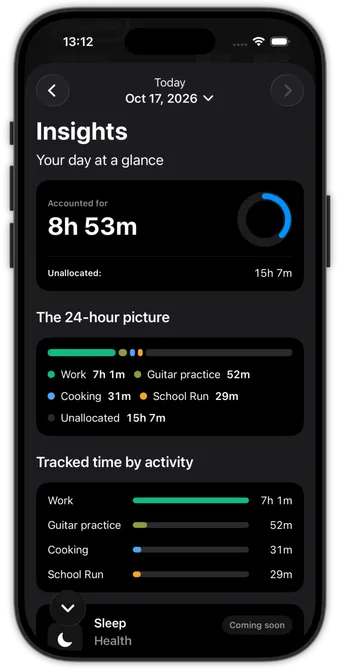
Open Insights and TiKC adds up your day for you, so you can see where the time really went.
- Accounted for. See how much of today you’ve tracked, and how much is still unallocated.
- The 24-hour picture. One bar shows your whole day, colour by colour.
- Tracked time by activity. Compare activities side by side to see what took up your day.
TiKC is built for people who want to know where their time goes, what takes up most of it, and how they could spend it better.
You’ve spent 00:00:00 reading about TiKC
Now start the clock.